

Hello everyone! So I assume everyone's been seeing the breakthroughs with AI as of late.
A simple game I've adored for two decades is a simple puzzle game called Magic Ball 2, but has had numerous issues on modern PC's.
I have quite a collection variants of this game with different build dates, including a late retitle called Smash Frenzy 2.
What I found is most builds on Windows 10+ there is no sound at all, as for Smash Frenzy 2 there is working sound as the assets are unpacked and not in encrypted archives.
...But due to Win10's/Win11's jankyness with backwards compatibility, Smash Frenzy 2 tends to only start 16-bit colour depths once for whatever reason and never run the game a second time.
Since the game uses locked hard-coded resolutions with 16-bit colour depth, I had to make a janky tool in the past to patch in custom resolutions as seen here.
But I was never able to fix the colour depth, the broken help menu under custom resolutions or the FOV as I don't have any x86 assembly skills. Just a hex editor guessing beforehand.
That all finally changes today, Claude Opus 5.5 has taken a shot at repairing the game and found that the games "MoleBox" DRM was responsible for breaking sound under modern Windows.
So it got rid of the problem by unpacking all the original executables, as a side bonus the engine reads all game assets from simple folders making modding the game very easy.
Smash Frenzy 2 was the only one I noticed that was unpacked from the start with browsable assets.
There was another sound issue where if your PC loads the next level too fast, the music will be muted as it was still fading from completing the previous level.
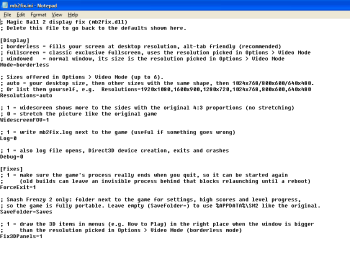
Claude was able to add make an injector called MB2Fix which adds support for 32-bit depths, borderless fullscreen, widescreen FOV and scaling correction for the broken 3D in the "How to play menu", fixing the music level transition bug for ALL the builds I had on hand.
MB2Fix supports the following builds:
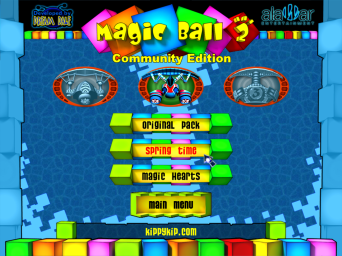
Since modding is incredibly easy now with the assets unpacked, I've compiled together a custom mod called "Magic Ball 2 - Community Edition" which glues together the "New Worlds" expansions (Spring Time & Magic Hearts) with the base game based on the December 2005 build (the only one to feature the 3D intro). All the languages found have been bundled and ported for this engine too.
This will give you the best Magic Ball 2 experience overall, or alternatively Smash Frenzy 2 also already bundled the 300 levels if you prefer that re-title, but you also lose the cool 3D intro.
Another unique change about Smash Frenzy 2 also by default saves in the %appdata% directory handles languages a little differently, supporting Russian under the hood.
Claude was able to add another patch in MB2Fix that makes it save in the /Saves directory instead making it portable again.
Otherwise if launched with OpenMB2 it replicates the original engine behavior of just saving your savegames and score beside the executable.
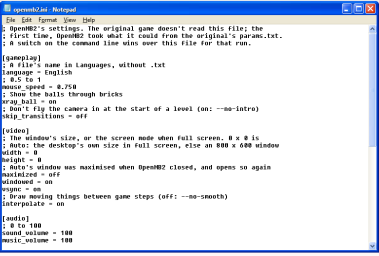
All these options can be configured in mb2fix.ini or openmb2.ini
Anyway! Enjoy!
The sources for the tools it made are also included, along with the original unpacked executable before the mb2fix thing.
--
HUGE Update 3! JUST IN TIME FOR MAGIC BALL MONDAY:
Using Claude again, it has developed an entirely new open source Magic Ball 2 compatible engine completely from scratch in C! OpenMB2

This engine fully replicates the original behaviour of the original game and compatible drop-in replacement executable for every version and release out there, included all original releases with MoleBox packed .pak assets.
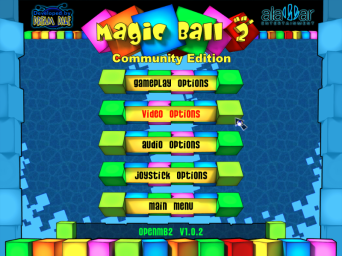
This version has has some massive enhancements to the original engine, including all the fixes from the previous MB2Fix dll injector, instead of DirectX and BASS, it uses OpenGLES2 and libopenmpt.
Improvements include:
Update 2:
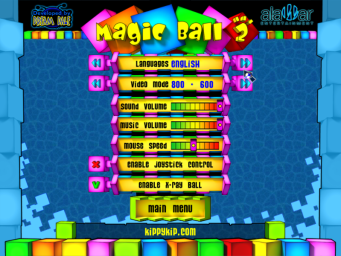
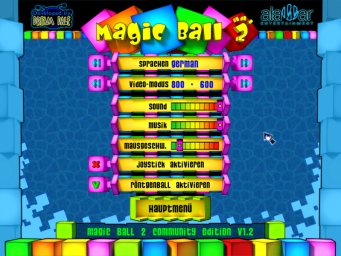
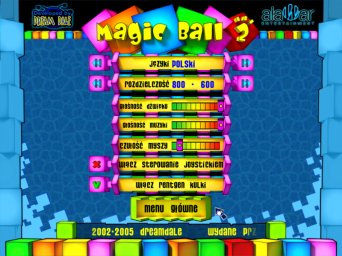
I've modified the menu definition files to re-enable the language switching functionality and this weird "Infravision" setting that makes the ball visible behind blocks. I've renamed it to X-Ray Ball
Update 1:
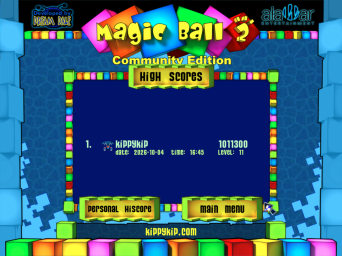
The high-score servers have now been resurrected!
You can change it to a custom one in mb2fix.ini if you prefer to host your own.
The high-scores should be compatible on all 2005+ MB2 builds, I've updated all the previous uploads to include it.
DOWNLOADS:
Magic Ball 2 - Community Edition V1.3 (Latest)
 CDN Download
Magic Ball 2 - Community Edition V1.2.1
CDN Download
Magic Ball 2 - Community Edition V1.2
CDN Download
Magic Ball 2 - Community Edition V1.1
CDN Download
MB2Fix Source Code + Reverse Engineering Notes (Claude Opus 5.5)
CDN Download
OpenMB2 Project Page + Source Code

 github.com
A simple game I've adored for two decades is a simple puzzle game called Magic Ball 2, but has had numerous issues on modern PC's.
I have quite a collection variants of this game with different build dates, including a late retitle called Smash Frenzy 2.
What I found is most builds on Windows 10+ there is no sound at all, as for Smash Frenzy 2 there is working sound as the assets are unpacked and not in encrypted archives.
...But due to Win10's/Win11's jankyness with backwards compatibility, Smash Frenzy 2 tends to only start 16-bit colour depths once for whatever reason and never run the game a second time.
Since the game uses locked hard-coded resolutions with 16-bit colour depth, I had to make a janky tool in the past to patch in custom resolutions as seen here.
But I was never able to fix the colour depth, the broken help menu under custom resolutions or the FOV as I don't have any x86 assembly skills. Just a hex editor guessing beforehand.
That all finally changes today, Claude Opus 5.5 has taken a shot at repairing the game and found that the games "MoleBox" DRM was responsible for breaking sound under modern Windows.
So it got rid of the problem by unpacking all the original executables, as a side bonus the engine reads all game assets from simple folders making modding the game very easy.
Smash Frenzy 2 was the only one I noticed that was unpacked from the start with browsable assets.
There was another sound issue where if your PC loads the next level too fast, the music will be muted as it was still fading from completing the previous level.
Claude was able to add make an injector called MB2Fix which adds support for 32-bit depths, borderless fullscreen, widescreen FOV and scaling correction for the broken 3D in the "How to play menu", fixing the music level transition bug for ALL the builds I had on hand.
MB2Fix supports the following builds:
Code:
Magic Ball 2 (16 Dec 2004)
Magic Ball 2 - New Worlds (22 Jun 2005)
Magic Ball 2 (29 Dec 2005)
Smash Frenzy 2 (26 Oct 2009)
Since modding is incredibly easy now with the assets unpacked, I've compiled together a custom mod called "Magic Ball 2 - Community Edition" which glues together the "New Worlds" expansions (Spring Time & Magic Hearts) with the base game based on the December 2005 build (the only one to feature the 3D intro). All the languages found have been bundled and ported for this engine too.
This will give you the best Magic Ball 2 experience overall, or alternatively Smash Frenzy 2 also already bundled the 300 levels if you prefer that re-title, but you also lose the cool 3D intro.
Another unique change about Smash Frenzy 2 also by default saves in the %appdata% directory handles languages a little differently, supporting Russian under the hood.
Claude was able to add another patch in MB2Fix that makes it save in the /Saves directory instead making it portable again.
Otherwise if launched with OpenMB2 it replicates the original engine behavior of just saving your savegames and score beside the executable.
All these options can be configured in mb2fix.ini or openmb2.ini
Anyway! Enjoy!
The sources for the tools it made are also included, along with the original unpacked executable before the mb2fix thing.
--
HUGE Update 3! JUST IN TIME FOR MAGIC BALL MONDAY:
Using Claude again, it has developed an entirely new open source Magic Ball 2 compatible engine completely from scratch in C! OpenMB2
This engine fully replicates the original behaviour of the original game and compatible drop-in replacement executable for every version and release out there, included all original releases with MoleBox packed .pak assets.
This version has has some massive enhancements to the original engine, including all the fixes from the previous MB2Fix dll injector, instead of DirectX and BASS, it uses OpenGLES2 and libopenmpt.
Improvements include:
Code:
* Built-in support for the custom high-score servers, with kippykip.com's resurrected high-score servers being the default
* Full controller support and rumble
* Keyboard / controller menu navigation
* Multi-platform (Windows, Linux, html5)
* Multi-arch (x86, x64, Arm, Enscripten)
* Languages can now use custom fonts (allows languages with special characters like "Russian" to work in the game)
* Mod support (Files are loaded from the OpenMB2 directory)
* Built-in widescreen support, with the 4:3 menus having borders
* Completely overhauled options menu, featuring many submenus and additional toggles like level transitions.
* Enhanced resolution switching with auto mode and free window resizing (alt+enter to toggle fullscreen)
* Frame interpolation for high framerates (toggle in video options, on by default)
* Cheats (launch with --cheats, use the numpad to spawn prizes and arrows to level skip)
* Many other minor bug fixes, such as broken bat animations for the other two bats, far smoother mouse movement, and better handling of transparent block ordering and many many more!
Update 2:
I've modified the menu definition files to re-enable the language switching functionality and this weird "Infravision" setting that makes the ball visible behind blocks. I've renamed it to X-Ray Ball
Update 1:
The high-score servers have now been resurrected!
You can change it to a custom one in mb2fix.ini if you prefer to host your own.
The high-scores should be compatible on all 2005+ MB2 builds, I've updated all the previous uploads to include it.
DOWNLOADS:
Magic Ball 2 - Community Edition V1.3
(Latest)
CDN Download
Magic Ball 2 - Community Edition V1.2.1
CDN Download
Magic Ball 2 - Community Edition V1.2
CDN Download
Magic Ball 2 - Community Edition V1.1
CDN Download
MB2Fix Source Code + Reverse Engineering Notes (Claude Opus 5.5)
CDN Download
OpenMB2 Project Page + Source Code
GitHub - Kippykip/OpenMB2: Open Source Magic Ball 2 Engine Re-Implementation
Open Source Magic Ball 2 Engine Re-Implementation. Contribute to Kippykip/OpenMB2 development by creating an account on GitHub.
github.com
Community Edition Changelog:
* V1.3
- Added a new language: French
- Bundled the OpenMB2 executables, which includes all the built-in enhancements that come with the new engine.
* V1.2.1
- Fixed a duplicate level in Spring Time that was causing all sorts of problems.
* V1.2
- Resurrect two disabled menu options: Language and Infravision (renamed to X-Ray Ball for better clarity)
- Include the two language files "German", "Polski" and port them to work on this particular version of the engine.
* V1.1
- Update MB2Fix to support fixing the muted music race condition bug when levels transition on fast computers.
- Update MB2Fix to support custom highscore servers for the game, with new ones being created.
* V1.0
- Original Release, adds the widescreen fix, unpacked files, combined level packs.
* V1.3
- Added a new language: French
- Bundled the OpenMB2 executables, which includes all the built-in enhancements that come with the new engine.
* V1.2.1
- Fixed a duplicate level in Spring Time that was causing all sorts of problems.
* V1.2
- Resurrect two disabled menu options: Language and Infravision (renamed to X-Ray Ball for better clarity)
- Include the two language files "German", "Polski" and port them to work on this particular version of the engine.
* V1.1
- Update MB2Fix to support fixing the muted music race condition bug when levels transition on fast computers.
- Update MB2Fix to support custom highscore servers for the game, with new ones being created.
* V1.0
- Original Release, adds the widescreen fix, unpacked files, combined level packs.
Last edited: