
GameBanana has now taken down this mod (but allows transfem Ralsei hmm...)
So I'm reuploading it, the new project home page is ModDB

 www.moddb.com
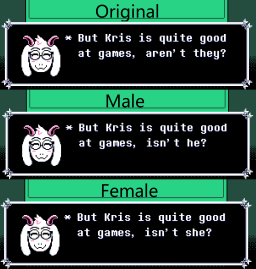
This mod switches out the they/them pronouns for Kris with either he/him or she/her, depending on your preference. If there's any instances that I missed on the male or female versions, let me know and I'll correct it.
This was created with UndertaleModTool. As of writing, the current patch numbers for the chapters, which can be seen on the bottom right after selecting a chapter, are as follows:
Current Patch for the Paid version: Chapter 5 Version 0.0.253 (the July 30th update)
Chapter 1: v1.43
Chapter 2: v1.52
Chapter 3: v.0.0.105
Chapter 4: v.0.0.110
Chapter 5: v.0.0.253
Current Patch for the Demo version and its chapters: V1.10
It is NOT recommended to use the XDelta patches or update the game if the versions are different than what's listed here. However, it should be safe to use the CSX Script regardless of patch numbers, barring any major changes to the dialogue.
HUGE THANKS TO EVERY_USERNAME_IS_TAKEN FOR CREATING THE CSX SCRIPT FOR COMPATIBILITY WITH OTHER MODS.
BATCH XDELTA INSTALLATION:
1. (Optional) Back up the unmodified lang_en.json file (for CH1) and data.win files (for CH2-5). For the demo version, this is the lang_en_ch1.json and the single data.win file for CH2.
2. Run the male OR female xdelta.bat file.
3. Copy and paste the game's installation path into the command prompt.
4. Press Enter. After a second or two, it should say the patches were applied successfully.
5. Enjoy!
---
INDIVIDUAL DELTA PATCHER INSTALLATION:
1. Download the files and launch the included Delta Patcher program.
2. (Optional) Back up the unmodified lang_en.json and data.win files. For the demo version, this is the lang_en_ch1.json for CH1 and the single data.win file for CH2.
3. Copy the path to the unmodified lang_en.json /data.win file located in the game directory OR drag and drop the file into the "Original file" path.
4. Copy the path to the Male or Female XDelta patch OR drag and drop the chosen file into the "XDelta patch" path. Make sure the part numbers on the XDelta files match the chapter numbers. For the demo version, use Part 1 with the .json file and Part 2 with the data.win file.
5. Click on Apply patch. If done correctly, you should see a popup saying that it was applied successfully.
6. Repeat this for the other chapters. Again, make sure the part numbers listed on the XDelta files match the chapter numbers.
6. Enjoy!
---
CSX SCRIPT INSTALLATION (NOTE THAT CH1 STILL REQUIRES DELTA PATCHER!):
So I'm reuploading it, the new project home page is ModDB
Gendered Kris file - DELTARUNE
This mod switches out the they/them pronouns for Kris with either he/him or she/her, depending on your preference.
This mod switches out the they/them pronouns for Kris with either he/him or she/her, depending on your preference. If there's any instances that I missed on the male or female versions, let me know and I'll correct it.
This was created with UndertaleModTool. As of writing, the current patch numbers for the chapters, which can be seen on the bottom right after selecting a chapter, are as follows:
Current Patch for the Paid version: Chapter 5 Version 0.0.253 (the July 30th update)
Chapter 1: v1.43
Chapter 2: v1.52
Chapter 3: v.0.0.105
Chapter 4: v.0.0.110
Chapter 5: v.0.0.253
Current Patch for the Demo version and its chapters: V1.10
It is NOT recommended to use the XDelta patches or update the game if the versions are different than what's listed here. However, it should be safe to use the CSX Script regardless of patch numbers, barring any major changes to the dialogue.
HUGE THANKS TO EVERY_USERNAME_IS_TAKEN FOR CREATING THE CSX SCRIPT FOR COMPATIBILITY WITH OTHER MODS.
BATCH XDELTA INSTALLATION:
1. (Optional) Back up the unmodified lang_en.json file (for CH1) and data.win files (for CH2-5). For the demo version, this is the lang_en_ch1.json and the single data.win file for CH2.
2. Run the male OR female xdelta.bat file.
3. Copy and paste the game's installation path into the command prompt.
4. Press Enter. After a second or two, it should say the patches were applied successfully.
5. Enjoy!
---
INDIVIDUAL DELTA PATCHER INSTALLATION:
1. Download the files and launch the included Delta Patcher program.
2. (Optional) Back up the unmodified lang_en.json and data.win files. For the demo version, this is the lang_en_ch1.json for CH1 and the single data.win file for CH2.
3. Copy the path to the unmodified lang_en.json /data.win file located in the game directory OR drag and drop the file into the "Original file" path.
4. Copy the path to the Male or Female XDelta patch OR drag and drop the chosen file into the "XDelta patch" path. Make sure the part numbers on the XDelta files match the chapter numbers. For the demo version, use Part 1 with the .json file and Part 2 with the data.win file.
5. Click on Apply patch. If done correctly, you should see a popup saying that it was applied successfully.
6. Repeat this for the other chapters. Again, make sure the part numbers listed on the XDelta files match the chapter numbers.
6. Enjoy!
---
CSX SCRIPT INSTALLATION (NOTE THAT CH1 STILL REQUIRES DELTA PATCHER!):
- Download the CSX Script and UndertaleModTool. UndertaleModTool can be found here.
- (Optional) Back up the unmodified data.win files.
- Launch a chapter's data.win file using UndertaleModTool.
- In the dropdown menu for "Scripts" located on the upper left, click on "Run other script..."
- Select the GenderedKris.csx file.
- You should get a popup window that detects the chapter and asks whether Kris should be male or female. Select whichever one you prefer.
- If everything is done correctly, another pop-up window will appear saying that the script is applied.
- Save the modified data.win file.
- Repeat steps 2 to 8 for the other chapters as necessary. Refer to the Delta Patcher installation for Chapter 1 as the change there is for the lang_en.json file (or lang_en_ch1.json for the demo version) and not the data.win file, which is what the script is made for.
- Enjoy!